Artificial intelligence is no longer reserved for technology giants with massive budgets and data centres.
A growing ecosystem of open-source AI tools is enabling developers, researchers, designers, creators, and businesses to build powerful AI systems locally, often at little or no cost.
What once required enterprise infrastructure can now run on a desktop workstation, a laptop, or even a home server.
The open-source AI movement is changing who controls artificial intelligence.
More importantly, it is changing who can build with it.
Why Open Source AI Matters
Most commercial AI platforms operate as closed systems.
Users interact through subscriptions, APIs, usage limits, and provider-controlled environments.
Open-source AI offers a different approach.
Benefits include:
- Full ownership of your data
- Greater privacy
- Complete customisation
- No vendor lock-in
- Lower long-term costs
- Community-driven innovation
- Local deployment options
Instead of renting intelligence, you can build and control it yourself.
Building a Local AI Stack
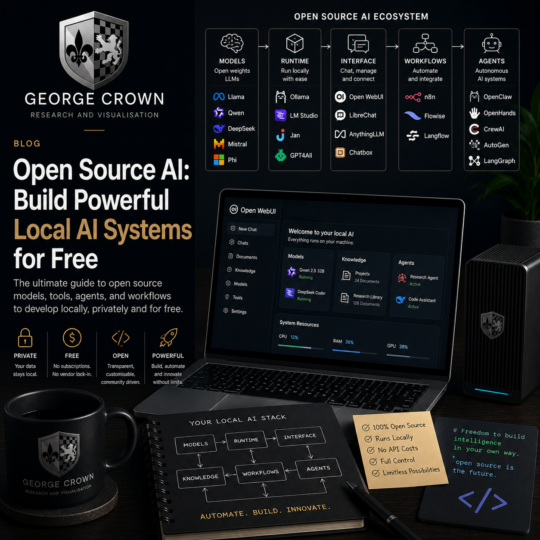
Modern open-source AI ecosystems are made up of several layers.
Models
The intelligence layer.
Interfaces
How users interact with the models.
Workflows
Automation systems that connect tools together.
Knowledge Systems
Document retrieval, memory, and research capabilities.
Agents
Autonomous systems capable of completing tasks.
Combined, these components form a complete AI operating environment.
Open Source Language Models
Large Language Models (LLMs) are often the foundation of local AI systems.
Popular open-source options include:
Llama
One of the most influential open-weight model families available.
Excellent for:
- General reasoning
- Research
- Writing
- Development
- Agent workflows
Qwen
Rapidly becoming one of the strongest open-source model families available.
Particularly effective for:
- Coding
- Reasoning
- Tool use
- Multilingual tasks
DeepSeek
A popular choice among developers.
Strong capabilities include:
- Programming
- Technical reasoning
- Agent workflows
- Software development
Mistral
Efficient models capable of excellent performance on modest hardware.
Ideal for:
- Local deployment
- Research tasks
- General productivity
Phi
Lightweight models designed for smaller systems while maintaining strong reasoning capabilities.
Running Models Locally
Once you have a model, you need a platform to run it.
Ollama
One of the simplest ways to run local AI.
Benefits include:
- Easy installation
- Fast model downloads
- Command line access
- API integration
- Excellent developer support
LM Studio
Provides a user-friendly graphical interface for downloading and running models locally.
Ideal for:
- Beginners
- Researchers
- Designers
- Non-technical users
Jan
An open-source AI desktop assistant designed around privacy and local-first principles.
GPT4All
A mature local AI platform focused on making AI accessible to everyone.
Open Source AI Interfaces
Models become significantly more useful when paired with powerful interfaces.
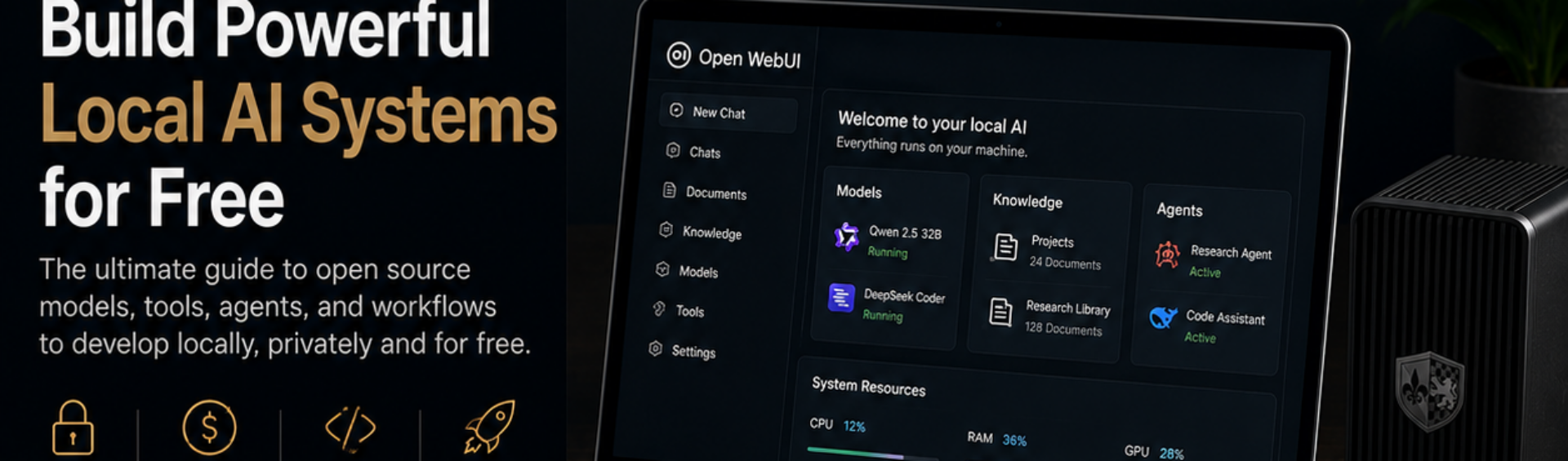
Open WebUI
Provides a ChatGPT-style experience for local models.
Features include:
- Multi-model support
- Document integration
- User management
- Knowledge systems
- Agent workflows
LibreChat
A flexible open-source chat platform supporting both local and cloud AI systems.
AnythingLLM
Designed for private knowledge management.
Perfect for:
- Research
- Documentation
- Company knowledge bases
- Personal knowledge systems
Open Source AI Development Tools
AI is increasingly becoming part of the software development workflow.
Continue
Adds AI capabilities directly to Visual Studio Code and other editors.
Supports:
- Local models
- Cloud models
- Custom workflows
Open Interpreter
Allows AI systems to interact with files, code, terminals, and applications.
Useful for creating powerful local automation systems.
Aider
An AI-powered coding assistant focused on real-world software development tasks.
Popular among developers using local models.
Open Source Workflow Automation
The real power of AI emerges when systems are connected together.
n8n
One of the most powerful open-source automation platforms available.
Connects:
- AI models
- APIs
- Databases
- Business tools
- Workflows
Flowise
Provides a visual environment for building AI pipelines and agent systems.
Langflow
A visual framework for creating sophisticated AI applications without extensive coding.
Open Source AI Agents
Agents represent the next stage of AI evolution.
Rather than responding to prompts, they pursue objectives.
OpenClaw
Designed around autonomous task execution and tool usage.
OpenHands
An open-source AI software engineer capable of performing development tasks.
CrewAI
Builds collaborative teams of specialised AI agents.
AutoGen
A framework for creating multi-agent systems that communicate and solve problems together.
LangGraph
A powerful framework for building advanced stateful AI agents and workflows.
A Complete Free Local AI Setup
A powerful open-source AI workstation can be built using:
Models
- Qwen
- DeepSeek
- Llama
Runtime
- Ollama
Interface
- Open WebUI
Knowledge Base
- AnythingLLM
Development
- Continue
- Aider
Automation
- n8n
Agents
- OpenClaw
- CrewAI
- OpenHands
This entire ecosystem can run locally and remain under your control.
Research and Visualisation
At George Crown, research and visualisation are fundamental to innovation.
Open-source AI dramatically enhances both.
Research systems can process information faster than ever before.
Visualisation tools can transform concepts into diagrams, renders, prototypes, and presentations.
Combined with automation and agent workflows, open-source AI enables a level of exploration and experimentation previously reserved for large organisations.
Final Thoughts
Open-source AI is not simply an alternative to commercial platforms.
It is creating a new model for innovation.
One where individuals own their tools.
Control their data.
Build custom workflows.
Create intelligent agents.
And develop powerful AI systems without subscription fees or vendor restrictions.
The future of artificial intelligence will not belong solely to large corporations.
It will belong to builders.
And open-source AI gives everyone the opportunity to become one.
Recommended Starting Stack
If you’re starting today:
- Install Ollama
- Run Qwen or DeepSeek locally
- Add Open WebUI
- Connect AnythingLLM
- Install Continue in VS Code
- Build workflows with n8n
- Experiment with OpenClaw or CrewAI
Within a few hours, you can have your own private AI ecosystem running entirely on your own hardware.